
Starting March 2026, Amazon is updating shipping method data for Seller Central NA and UK & EU integrations. This change will impact how inbound ship methods are determined in ShipWise and will require updates to user Marketplace Mapping rules.
What Is Changing
The following changes apply to Amazon Seller Central NA and Amazon Seller Central UK & EU integrations:
Previously the ShipWise Marketplace Inbound Shipmethod was determined by the combination of the Amazon “ShipmentServiceLevelCategory” (ex: Standard, Expedited, NextDay, FreeEconomy) and the "ShipServiceLevel" (ex: Std US D2D Dom, Exp US D2D Dom, Next US D2D Dom, Econ US Dom)
Amazon will be depreciating the “ShipServiceLevel" field and changing the name of the “ShipmentServiceLevelCategory” field to “FullmentServiceLevel.”
Moving forward the ShipWise Marketplace Inbound Shipmethod will be determined by the Amazon “FulfillmentServiceLevel” field value.
Supported 'FulfillmentServiceLevel' Values
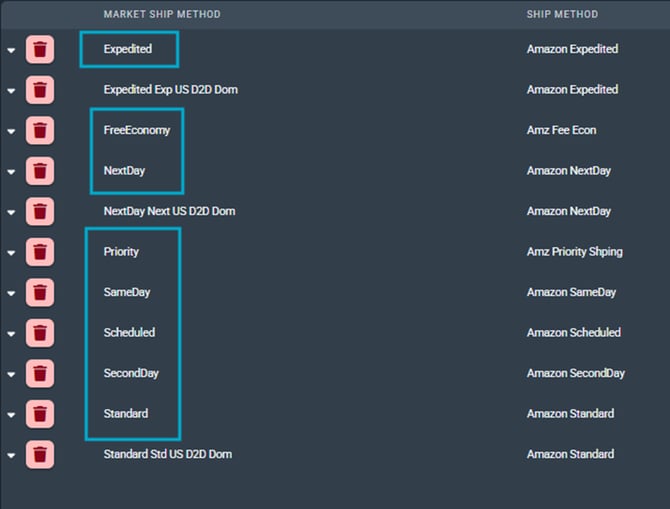
ShipWise supports the following values:
New Carrier Marketplace Mappings
Inbound Shipmethod mapping rules for Amazon Seller Central should be created for the above “FulfillmentServiceLevel” values.
Users must create new inbound Shipmethod mapping rules for each applicable 'FulfillmentServiceLevel' value.
Important: Do Not Delete Existing Mapping Rules
Please do not update or remove any existing Amazon Seller Central Shipmethod mappings. Preexisting unshipped Amazon orders may still reference the deprecated ship methods. Removing those mappings could affect fulfillment for those orders.
What Users Need To Do
Step by step guide:
-
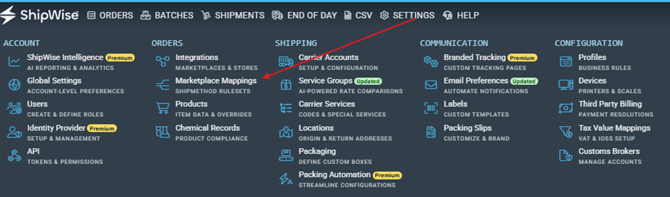
Log in to the ShipWise WebApp and navigate to Settings > Marketplace Mappings
-
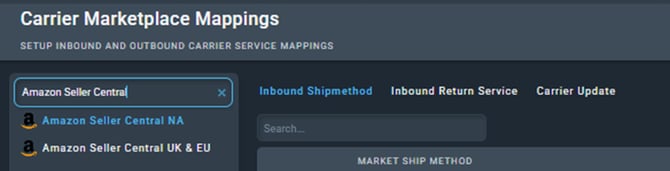
Select your Amazon Seller Central integration
-
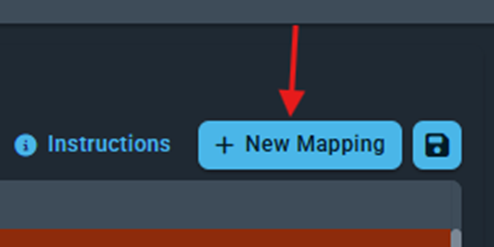
Click "+ New Mapping" to create new inbound Shipmethod mapping rules for each FulfillmentServiceLevel value
-
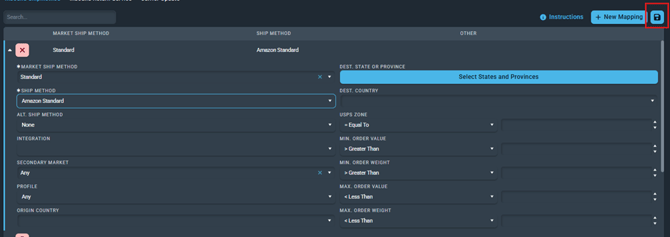
When creating a new mapping rule, the Market Ship Method field in the ShipWise UI is where you enter the Amazon 'FulfillmentServiceLevel' value. After typing the value, continue configuring the Ship Method and any additional routing conditions as needed.
-1.png?width=670&height=335&name=image%20(56)-1.png)
Important: Even if the value does not appear in the dropdown menu, you can manually type the 'FulfillmentServiceLevel' value directly into the Market Ship Method field. It does not need to be pre-populated or selectable from the list in order to be saved.
5. Save your updates and review that all new ship methods have been added.
Note: If you have Saved Advanced Searches or Subscribed Tags that reference deprecated Amazon ship methods, you will need to create new versions aligned to 'FulfillmentServiceLevel' values.
Why This Matters
Marketplace Shipping Method Mapping ensures your Amazon orders route correctly to the appropriate carrier service or service group without manual intervention.
Updating these mappings will help prevent:
-
Incorrect carrier selection
-
Manual intervention during fulfillment
-
Shipping delays
-
Operational exceptions in high-volume workflows
For enterprise fulfillment and 3PL teams, maintaining accurate service mappings is critical to keeping automated shipping rules functioning as expected.