
Add a FedEx Account in ShipWise
FedEx is one of the largest global shipping carriers, offering domestic and international shipping services including express, ground, and freight options. ShipWise integrates directly with FedEx to allow customers to rate shipments, generate shipping labels, and track packages from within the ShipWise platform.
Before You Begin
To connect FedEx to ShipWise, you will need:
-
A valid FedEx account number
-
The billing address associated with your FedEx account
-
Contact information tied to the account (name, phone, and email)
All FedEx rates returned in ShipWise are based on your FedEx contract and account configuration.
Step 1: Navigate to Carrier Settings
-
Log in to the ShipWise Web App.
-
Go to Settings.
-
Select Carriers.
-
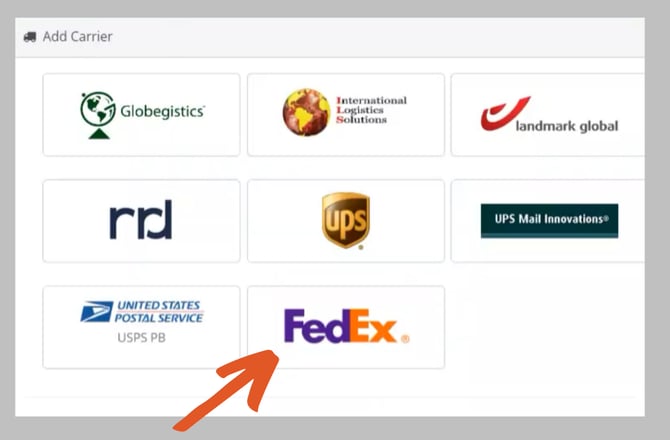
Click Add Carrier.
-
Select FedEx from the list of available carriers.
Step 2: Enter Your FedEx Account Information
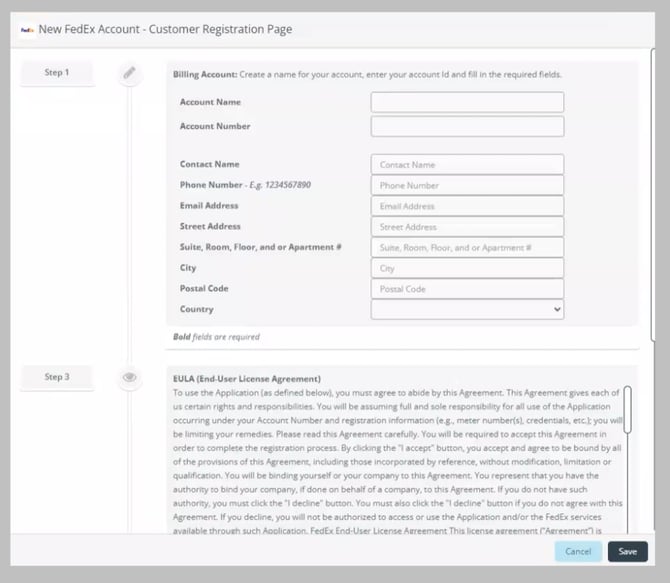
Enter the required FedEx account information in the onboarding window.
Required fields include:
-
Account Name
-
FedEx Account Number
-
Billing Address
-
City, State, and Postal Code
-
Contact Name
-
Phone Number
-
Email Address
The billing address entered must match the address associated with your FedEx account. If the address does not match the information on file with FedEx, authentication may fail.
If you experience authentication errors, contact FedEx Customer Support at 1-877-339-2774 to confirm the billing address associated with your account.
Step 3: Accept the Terms and Complete Setup
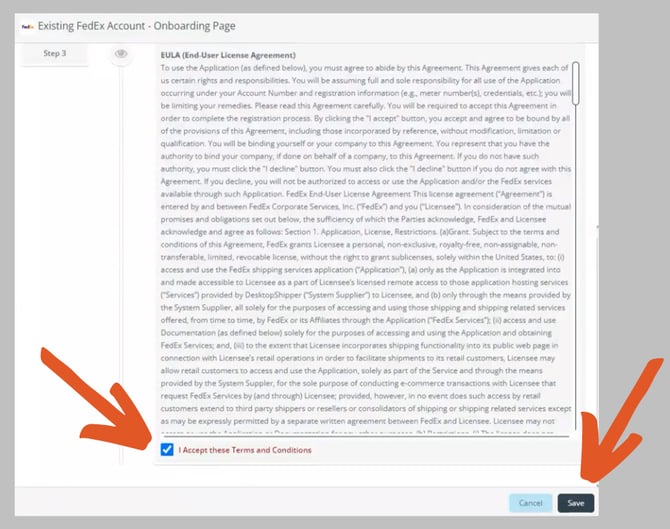
Review the FedEx agreement presented during onboarding.
To complete the setup:
-
Check the box to accept the FedEx terms and conditions
-
Click Save
Once saved, ShipWise will verify the account connection.
Step 4: Link the FedEx Account to a Shipping Profile
After the FedEx account is successfully added, it will appear in your Carrier Accounts list.
To begin shipping with this account, make sure it is assigned to the appropriate shipping profile within ShipWise.
Shipping profiles allow you to control:
-
Carrier availability
-
Service options
-
Rate shopping rules
-
Shipment automation
Assigning the FedEx account to a profile ensures the carrier is available when processing shipments.
-1-2.png?width=670&height=459&name=onboarding%20step%203%20(2)-1-2.png)
More information
How to Migrate an Existing FedEx SOAP Account to FedEx's REST API
Need Help?
If you need assistance connecting your FedEx account or experience authentication issues, please contact the ShipWise support team.